In the “Vulnerabilities” menu item under technical details you'll find a list of all found vulnerabilities including their technical descriptions and step-by-step solutions. You can easily export this data as a CSV file and use it as a guide for technical implementations.
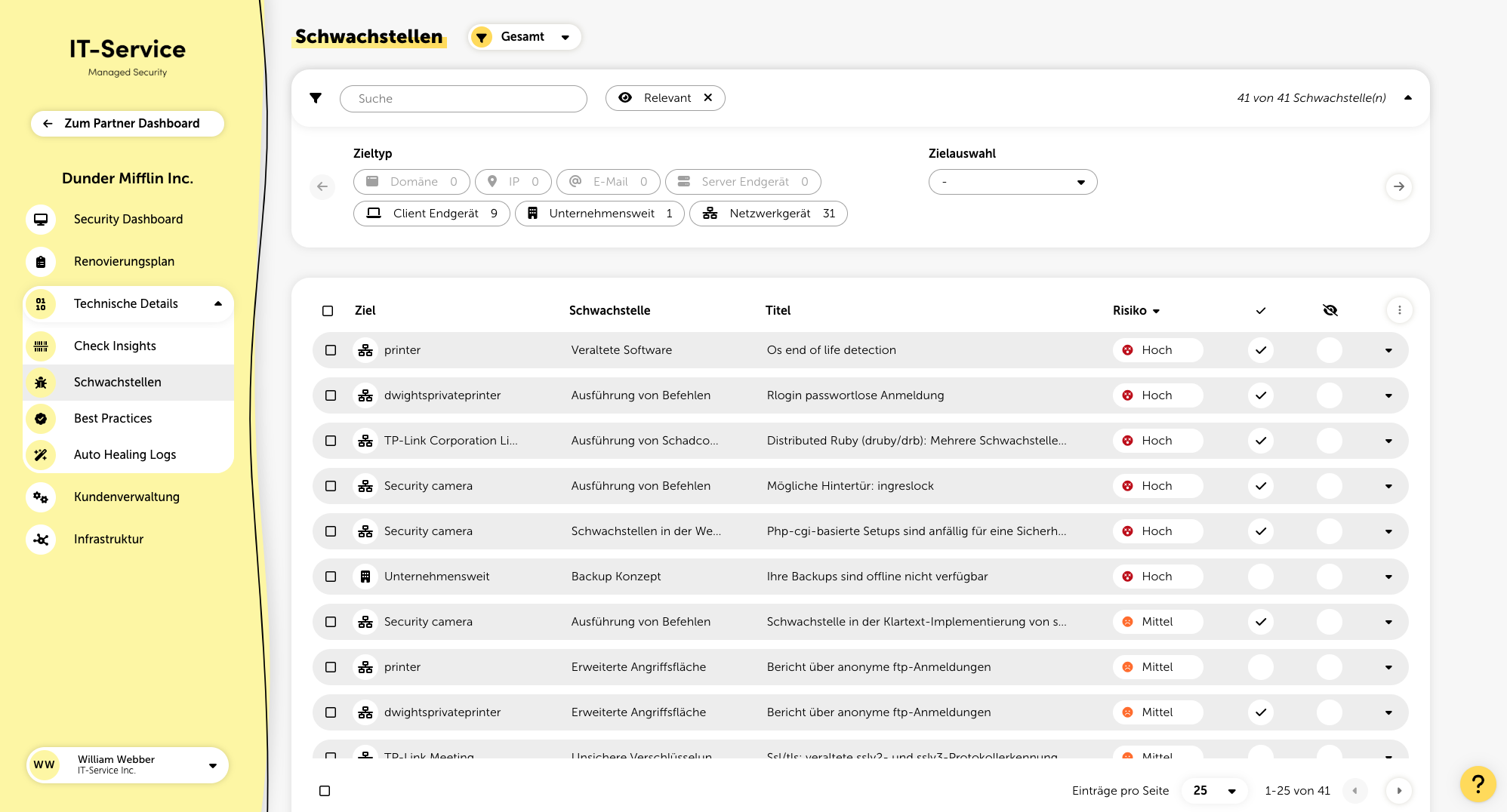
In the filter panel, vulnerabilities can be filtered by target type, specific targets, risk assessment, asset value, measures, products, and relevance. In addition, the full-text search lets you filter for specific vulnerabilities, and you can even search by certain CVE-IDs if you want.
In the listing, you can see the following information for each vulnerability:
Name of the target (specific target or company-wide vulnerability)
Description of the vulnerability (rough categorization)
Title (name of the specific vulnerability)
Risk assessment (split into high, medium, and low)
Indicator if a relevant measure is planned for the vulnerability
Optional: Mark vulnerability as done
Indicator if the vulnerability was ignored
Sometimes, it’s not possible to detect automatically if a measure has been implemented. For example, with the vulnerability “Compromised user data”. For this case, the button "Mark as done" was introduced. This manually marks the vulnerability as done, removes it from the list, and it won’t show up again even after scanning.
If, for example, new compromised user passwords become known, a new vulnerability will show up.
When you expand a vulnerability, you can choose to ignore it. The vulnerability then no longer affects your overall security rating.
To keep track of who ignored a certain vulnerability, when, and why, it’s automatically logged which user ignored the vulnerability and when. You can also add an internal note, if you want.
You can also ignore vulnerabilities globally. To do that, in the popup, under “Ignore globally” just click the "Enable" switch. The globally ignored vulnerability will then show up at partner level in the general settings and you can remove it from there any time.
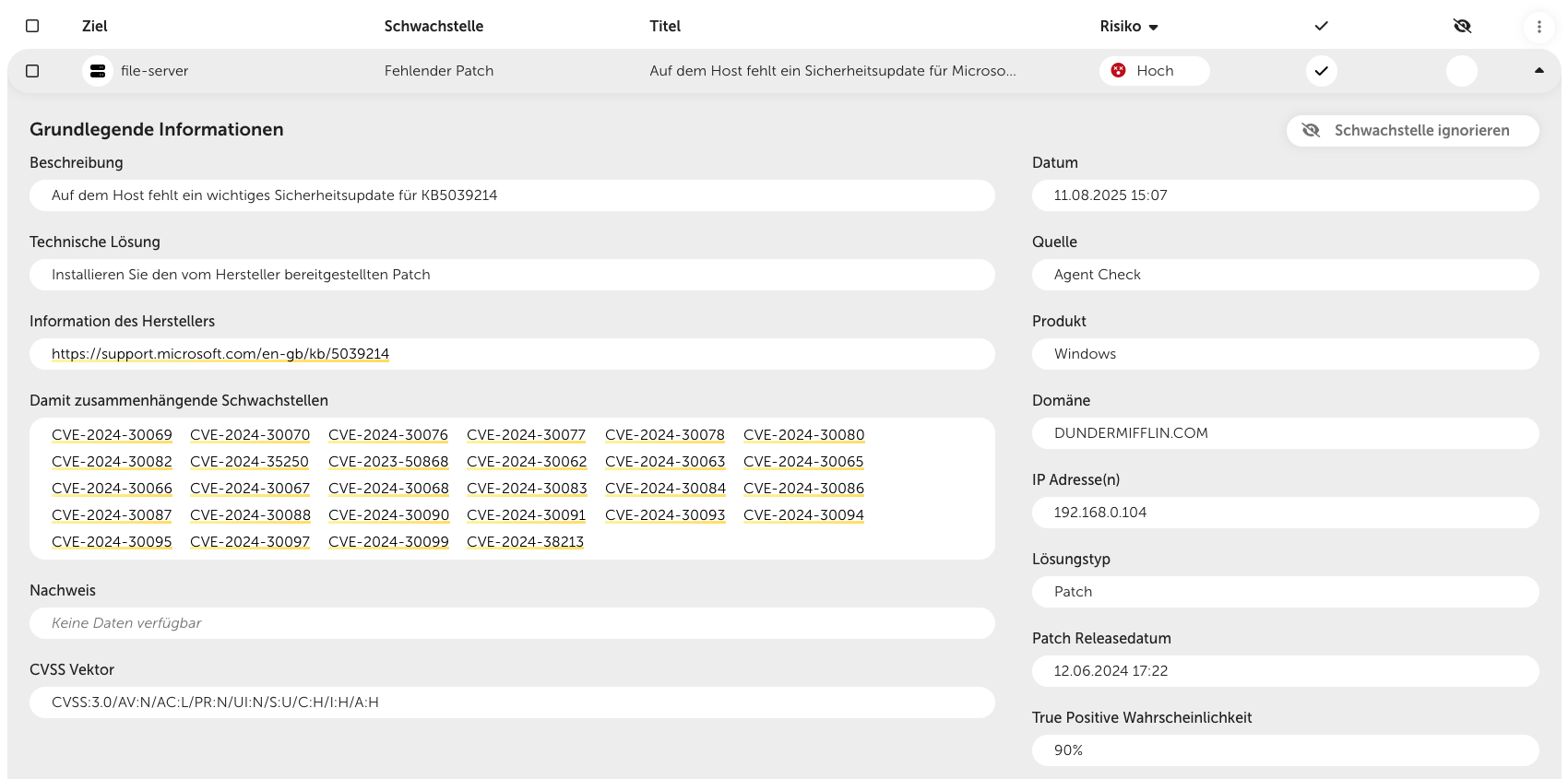
If you click on a vulnerability, you’ll go one level deeper and get detailed info about it. Depending on the type of target and vulnerability, the displayed info might change a little. But typically, you’ll see these details:
A general description of the vulnerability
The recommended technical solution to fix the vulnerability
A link to more detailed vendor information – only shown for vulnerabilities that refer to a specific product
A list of related vulnerabilities – this applies to vulnerabilities that can be assigned to several CVE-IDs
The technical proof, which indicates on what basis the detection of the vulnerability took place
CVSS vector for assessing the criticality
The vulnerability ID – is shown if the vulnerability can be linked to a specific CVE-ID (see “related vulnerabilities”)
The date, when the vulnerability was first found on the target
The source, from which check method the vulnerability was found
The solution type of the vulnerability (e.g. “Patch”)
If a vulnerability can be fixed by a patch, the patch release date is displayed here
True positive probability – percentage that shows how likely it is that the vulnerability actually exists (see Filtering out false positives)
For each vulnerability, an individual risk assessment is created, based on these factors:
Severity (CVSS)
To determine the severity, we use CVSS (Common Vulnerability Scoring System). This score looks at different metrics like how a vulnerability impacts the confidentiality, integrity, and availability of data, along with how easy or hard it is to exploit the vulnerability.
Likelihood (EPSS)
We use EPSS (Exploit Prediction Scoring System) to figure out the likelihood. Every day, artificial intelligence checks how likely it is that the discovered vulnerability will get exploited by an attacker in the next 30 days. This depends on things like how long the vulnerability has been known, if exploit code is publicly available, and if there are any security scanners searching for it.
Known Exploited Vulnerability (CISA KEV)
CISA's Known Exploited Vulnerabilities (KEV) catalog shows if a vulnerability has already been successfully exploited, and also points out those connected to ransomware campaigns.
Asset Value
The asset value reflects the financial, operational, or strategic value of a certain target within an organization. It plays a key role in risk assessments and prioritizing security measures. Asset values for individual targets can be set in the Infrastructure menu. Also, in the general settings you can define default asset values for the different target types.

At the bottom of the detail view, you can plan recommended actions for the specific vulnerability directly.

