Lots of areas and features of lywand can be automated with API requests. This FAQ gives you a quick overview of how to use the API so you can get started fast.
With the lywand API, you can for example:
Manage customers: Add customers, view their data, edit or delete them
Manage targets: Add and remove your customers' targets
Start scans: Start scans for your targets and fetch results
Get analyses: Get direct access to analyses and metrics to keep an eye on your customers' security
To use the lywand API, you need an API key, which you can then link to your services. To create a new key, go to the IT service provider menu and select Settings > API.
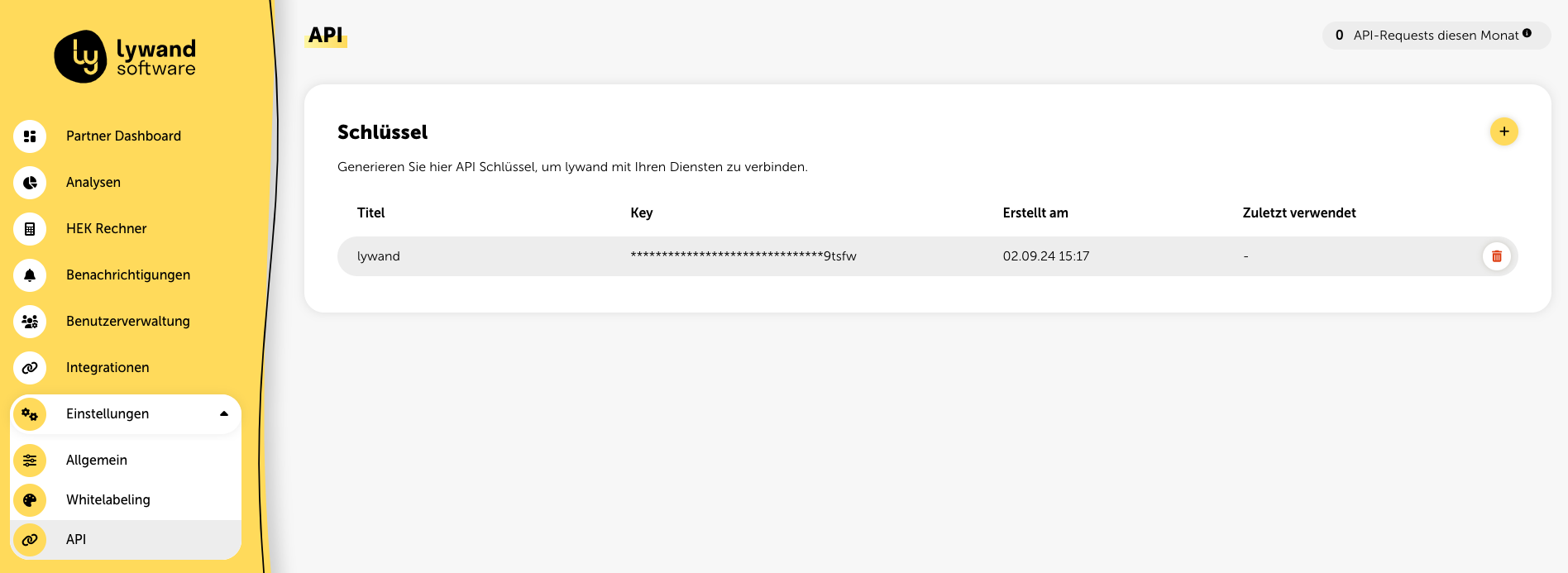
Here you can create new API keys and remove existing ones. You can use multiple keys at the same time. At the top right of this page, you'll also see an overview of the API requests you've made this month.
With your API key, you can develop against the URL https://api01.lywand.com. A detailed OpenAPI description is also available at this URL.
Here are some basic examples to help you get started with using the lywand API:
Overview of all customers (Partner Dashboard)
Get a detailed overview of all your customers:
curl -X 'GET' \
  'https://api01.lywand.com/api/v1/partner/dashboard/' \
  -H 'cookie: access_token_cookie=<API-KEY>' \
  -H 'Accept-Language: de-DE'
Create new customer
Add a new customer plus customer details:
curl -X 'POST' \
  'https://api01.lywand.com/api/v1/tenants/' \
  -H 'cookie: access_token_cookie=<API-KEY>' \
  -H 'Accept-Language: de-DE'
  -H 'accept: application/json' \
  -H 'Content-Type: application/json' \
  -d '{ "companyName": "string", "companySize": "string", "licenseKey": "string", "website": "string", "sector": "string", "billingAddress": { "country": "string", "postalCode": "string", "city": "string", "street": "string" }, "setupComplete": true, "customerReference": "string", "contractReference": "string", "createDemoAccount": true }'
Cross-customer overview of all vulnerabilities and products (analysis dashboard)
Query metrics from the analysis dashboard:
curl -X 'GET' \
  'https://api01.lywand.com/api/v1/partner/analysis/vulnerabilities' \
  -H 'cookie: access_token_cookie=<API-KEY>' \
  -H 'Accept-Language: de-DE'
Query a customer's targets
Get an overview of all a customer's targets:
curl -X 'GET' \
  'https://api01.lywand.com/api/v1/infrastructure/targets/' \
  -H 'cookie: access_token_cookie=<API-KEY>' \
  -H 'Accept-Language: de-DE'
Create target
Create a new external target for a customer:
curl -X 'POST' \
  'https://api01.lywand.com/api/v1/infrastructure/targets/' \
  -H 'cookie: access_token_cookie=<API-KEY>' \
  -H 'Accept-Language: de-DE'
  -H 'accept: application/json' \
  -H 'Content-Type: application/json' \
  -d '{ "identifier": "string" }'
Delete target
Delete one or more targets of a customer:
curl -X 'POST' \
  'http://api01.lywand.com/api/v1/infrastructure/targets/bulk/delete' \
  -H 'cookie: access_token_cookie=<API-KEY>' \
  -H 'Accept-Language: de-DE'
  -H 'accept: application/json' \
  -H 'Content-Type: application/json' \
  -d '{ "identifiers": [ "string" ] }'
Edit target
Edit info for one or more targets of a customer:
curl -X 'PUT' \
  'http://api01.lywand.com/api/v1/infrastructure/targets/bulk/update' \
  -H 'cookie: access_token_cookie=<API-KEY>' \
  -H 'Accept-Language: de-DE'
  -H 'accept: application/json' \
  -H 'Content-Type: application/json' \
  -d '{
  "targets": [
    {
      "identifier": "string",
      "name": "string",
      "active_directory": {
        "domain": "",
        "distinguished_name": ""
      },
      "display_name": "string",
      "target_type": "string",
      "ips": [
        "string"
      ]
    }
  ]
}'
Start an external scan
Start an external scan:
curl -X 'POST' \
  'https://api01.lywand.com/api/v1/scans/' \
  -H 'cookie: access_token_cookie=<API-KEY>' \
  -H 'Accept-Language: de-DE'
-H 'accept: application/json'All API requests are basically performed in the context of the account the API key was created with. If you want to access a customer's data or perform actions for a customer, you have to specify this special customer context.
You can add the parameter ?tenant=tenant_id to the URL. This parameter lets you execute the request for a specific customer.
curl -X 'GET' \
  'https://api01.lywand.com/api/v1/results/vulnerabilities/?tenant=tenant_id' \
  -H 'cookie: access_token_cookie=<API-KEY>' \
  -H 'Accept-Language: de-DE'
Vulnerabilities, measures, and various other content is translated automatically by the API. For this, you can use the HTTP header "Accept-Language". Right now, German (de-DE) and English (en-GB) are supported.
In this example, measures are returned in German:
curl -X GET 'https://api01.lywand.com/api/v1/results/measures/' \
  -H 'cookie: access_token_cookie=<API-KEY>' \
  -H 'Accept-Language: de-DE'
Here's what it looks like in English:
curl -X GET 'https://api01.lywand.com/api/v1/results/measures/' \
  -H 'cookie: access_token_cookie=<API-KEY>' \
-H 'Accept-Language: en-GB' 